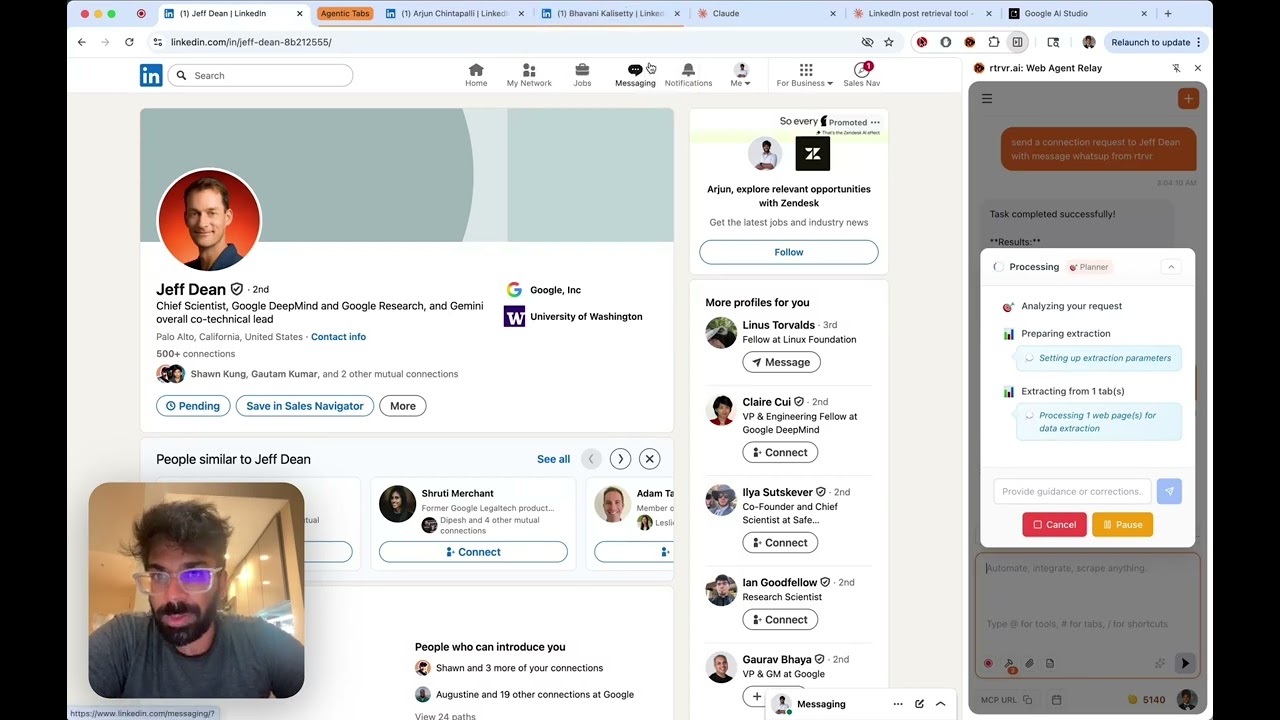
rtrvr vs Perplexity Comet: Why Flight Booking Demos Fall Flat
Perplexity's Comet burst onto the scene with flashy demos of ordering DoorDash and booking flights. Tech Twitter went wild.
But here's what they're not telling you: Comet costs $200/month, works on one tab at a time, and can only be triggered from your keyboard.
Meanwhile, rtrvr.ai powers 212,000+ professional workflows: extracting data from behind logins, automating research at scale, and turning spreadsheets into autonomous scrapers—for free with your own Gemini API key.
Try scraping data from behind a LinkedIn login. Extract pricing from 500 competitor websites. Monitor job postings across walled gardens. Automate research workflows that touch banking portals, internal tools, and protected databases.
That's where consumer demos become enterprise nightmares. And it's exactly where rtrvr.ai lives.
TL;DR: The 60-Second Comparison
| Capability | Perplexity Comet | rtrvr.ai |
|---|---|---|
| Price | $200/month (Pro) | Free with Gemini API key |
| Tab Execution | Single active tab only | 10+ parallel background tabs |
| Remote Triggering | ❌ Manual only | ✅ API, MCP, WhatsApp, multi-device |
| Background Execution | ❌ Browser must be visible | ✅ Works in background tabs |
| Google Sheets | ❌ Not integrated | ✅ Native read/write + workflows |
| Architecture | Screenshot/vision-based | DOM-native (no screenshots) |
| Speed | Up to 5x slower than manual | 7-13x faster than alternatives |
| Privacy | Screenshots everything | DOM-only, no visual capture |
| Protected Sites | Limited access | Works everywhere you can browse |
| Benchmark Success | Not disclosed | 81.39% (SOTA) |
The fundamental question: Do you want to pay $200/month for an agent that watches your screen and works on one tab at a time?
The $200/Month Problem
Let's address the elephant in the room: Perplexity Pro costs $200/month for the full Comet experience with unlimited usage.
For comparison, rtrvr.ai is:
- Completely free when you bring your own Gemini API key
- $9.99/month for 1,000 credits if you prefer managed usage
- $0.12 average per task on our cloud platform
But here's the real kicker: even at $200/month, Comet gives you an agent that:
- Works on one tab at a time
- Requires your browser to be visible
- Can only be triggered manually
- Has no API or remote access
You're paying premium prices for consumer-grade capabilities.
The BYOK Advantage
rtrvr.ai's Bring Your Own Key model changes the economics entirely:
Perplexity Comet: $200/month = $2,400/year
rtrvr.ai + Gemini: $0/month = $0/year (Gemini Flash is nearly free)
Get a free Gemini API key from Google AI Studio, paste it into rtrvr.ai, and you have unlimited web automation at zero cost.
The Tale of Two Markets
Consumer Agent (Comet):
- Order food delivery
- Book groceries
- Browse shopping sites
- Handle simple, public transactions
- One tab, one task, one user watching
Professional Vibescraping (rtrvr.ai):
- Extract data from behind logins
- Scrape at scale across protected sites
- Automate complex research workflows
- Turn spreadsheets into autonomous scrapers
- Monitor competitors behind paywalls
- 10+ tabs, parallel execution, triggered remotely
One is a demo. The other is infrastructure.
Single Tab vs. 10+ Parallel Tabs
This is the architectural difference that matters most for real work.
Comet: One Tab at a Time
Comet uses screenshot-based vision models. This means:
- Browser must be visible – Can't work in background
- Single active tab – Context degrades on inactive tabs
- Sequential execution – One task, then the next, then the next
- User must watch – You're locked to your computer
Some users report Comet can be up to 5x slower than manual execution for complex tasks. That's not automation—that's supervised babysitting.
rtrvr.ai: Parallel Background Execution
Because rtrvr.ai reads the DOM directly (not pixels), we can work on tabs you're not even looking at:
Your Browser While Using rtrvr.ai:
├── Tab 1: LinkedIn (agent extracting connections) [background]
├── Tab 2: Competitor A (agent monitoring prices) [background]
├── Tab 3: Competitor B (agent monitoring prices) [background]
├── Tab 4: Google Sheets (agent writing results) [background]
├── Tab 5: Your actual work (you doing your thing) [active]
├── Tab 6: Job board A (agent scraping listings) [background]
├── Tab 7: Job board B (agent scraping listings) [background]
└── Tabs 8-10: More parallel automation [background]
Real math:
- Comet: 100 URLs × 2 minutes each = 200 minutes (3+ hours)
- rtrvr.ai: 100 URLs ÷ 10 parallel tabs × 2 minutes = 20 minutes
That's a 10x productivity multiplier before you even consider that rtrvr.ai is free.
Remote Triggering: The Integration Gap
Here's where Comet's consumer focus becomes a professional limitation.
Comet: Manual Keyboard Only
Comet can only be triggered by:
- Typing in the Perplexity interface
- Sitting at your computer
- Watching it work
That's it. No API. No webhooks. No remote access. No integration with your existing tools.
rtrvr.ai: Your Browser as an API Endpoint
rtrvr.ai transforms your browser into programmable infrastructure:
# Trigger from terminal, scripts, CI/CD, anywhere
curl -X POST "https://mcp.rtrvr.ai" \
  -H "Authorization: Bearer rtrvr_YOUR_KEY" \
  -H "Content-Type: application/json" \
  -d '{
    "tool": "planner",
    "params": {
      "user_input": "Extract competitor pricing to my tracking sheet",
      "tab_urls": ["https://competitor.com/pricing"]
    }
  }'
Five ways to trigger rtrvr.ai:
- Chrome Extension – Direct browser control with UI
- REST API – Programmatic access from any language
- MCP Server – Works with Claude.ai, Cursor, any MCP client
- WhatsApp – Send voice notes, get structured data back
- Multi-device – Control multiple Chrome profiles simultaneously
MCP Integration: The Power Move
The Model Context Protocol (MCP) turns rtrvr.ai into a tool any AI can use:
// Connect rtrvr.ai to Claude.ai via MCP
// Your browser becomes Claude's hands

Claude: "Research these 5 companies and summarize their pricing"
         ↓
rtrvr.ai MCP: Opens 5 tabs in parallel
              Extracts pricing from each
              Returns structured data to Claude
         ↓
Claude: Synthesizes summary from real, live data
Use cases this enables:
- Slack bots that trigger browser automation
- CI/CD pipelines that run web tests
- Cron jobs that monitor competitors
- AI assistants that can actually browse the web
- Mobile access via WhatsApp while you're away from your desk
Comet can't do any of this. It's trapped in the browser window.
Multi-Device: Your Automation Fleet
rtrvr.ai doesn't just control one browser—it can orchestrate multiple:
# List all your connected browsers
curl -X POST "https://mcp.rtrvr.ai" \
  -H "Authorization: Bearer rtrvr_YOUR_KEY" \
  -d '{"tool": "list_devices"}'

# Response:
{
  "devices": [
    {"deviceId": "abc123", "name": "Work Laptop", "status": "online"},
    {"deviceId": "xyz789", "name": "Home Desktop", "status": "online"},
    {"deviceId": "def456", "name": "Research VM", "status": "online"}
  ]
}
Target specific devices:
curl -X POST "https://mcp.rtrvr.ai" \
  -H "Authorization: Bearer rtrvr_YOUR_KEY" \
  -d '{
    "tool": "planner",
    "params": {"user_input": "Monitor pricing on Amazon"},
    "deviceId": "abc123"
  }'
Distributed workflows:
- Run different tasks on different machines
- Use work laptop for work sites, home desktop for personal
- Spin up research VMs for high-volume scraping
- Coordinate across time zones
Comet? One browser. One tab. One user watching.
Privacy & Security: Screenshots vs. DOM
Comet: Screenshots Capture Everything
When Comet takes a screenshot to understand your browser:
- Your bookmarks bar is captured
- Your open tabs are visible
- Any notification badges are seen
- Visible passwords could be captured
- Personal messages might be in view
- Banking tabs in background are exposed
This visual data gets sent to cloud servers for processing. In enterprise environments, this is often a non-starter.
rtrvr.ai: DOM-Only, No Visual Capture
rtrvr.ai reads the HTML structure of the page—the Document Object Model. We never:
- Take screenshots
- Capture your screen
- See your other tabs
- Process visual data
Comet: Screenshot → Cloud Vision Model → Interpretation
       (captures everything visible)

rtrvr.ai: DOM → Local Processing → Structured Understanding
          (only the page you're automating)
This isn't just more private—it's faster and more accurate. No OCR errors, no missed elements, no visual hallucinations.
Google Sheets: The Killer Integration
Comet has no Sheets integration. You get results and manually copy them somewhere.
rtrvr.ai: Sheets as Your Control Plane
1. Upload Sheet with 500 company URLs in Column A
2. Prompt: "For each URL, extract CEO name, funding, and tech stack"
3. rtrvr.ai opens parallel sub-agent tabs
4. Results appear in Columns B, C, D
5. Done in 20 minutes, not 8 hours
Sheets Workflow Features:
- Per-row execution – Each row becomes an independent task
- Parallel processing – 10+ tabs working simultaneously
- Auto-append mode – Scheduled runs add rows over time
- Schema validation – Consistent, typed output
- Direct integration – No export/import dance
Example: Daily Job Monitoring
Sheet: "Job Tracker"
├── Column A: Job board URLs
├── Column B: Search filters
├── Schedule: Daily at 9 AM
├── Mode: Append new listings
└── Result: Growing database of opportunities
Consumer Tasks vs Professional Workflows
What Comet Demos:
"Order pad thai from my favorite restaurant"
"Book grocery delivery for tomorrow"
"Find and purchase a blue sweater"
What rtrvr.ai Actually Ships:
"Extract all job postings from these 50 LinkedIn companies"
"Monitor competitor pricing behind their login walls daily"
"Scrape financial data from banking portals with 2FA"
"Turn this list of 1000 URLs into structured research data"
"For each company in my Sheet, find decision-maker contacts"
The difference isn't complexity—it's capability. rtrvr.ai can do what Comet demos, but Comet can't do what rtrvr.ai ships.
The Benchmark Reality
Perplexity hasn't published benchmark results for Comet. We have.
rtrvr.ai on Halluminate Web Bench:
| Metric | rtrvr.ai | Comet | Industry Avg |
|---|---|---|---|
| Success Rate | 81.39% | Not disclosed | 40-66% |
| Read Tasks | 88.24% | Not disclosed | ~60% |
| Write Tasks | 65.63% | Not disclosed | ~40% |
| Avg Time | 0.9 min | "Up to 5x slower" | 6-12 min |
| Cost/Task | $0.12 | ~$0.20+ | $0.50-3.00 |
Real-World Performance Comparison
From production usage across 212,000+ workflows:
| Metric | rtrvr.ai | Comet |
|---|---|---|
| Parallel Tabs | 10+ simultaneous | 1 active only |
| Background Execution | ✅ Yes | ❌ No |
| Protected Sites | ✅ Full access | ❌ Limited |
| Bulk Operations | ✅ Thousands/hour | ❌ One at a time |
| Privacy | ✅ DOM-only | ⚠️ Screenshots |
| Remote Trigger | ✅ API/MCP/WhatsApp | ❌ Manual only |
| Multi-Device | ✅ Fleet control | ❌ Single browser |
| Scheduling | ✅ Built-in | ❌ No |
| Sheets Integration | ✅ Native | ❌ None |
| Infrastructure Errors | 3.39% | Not disclosed |
Integration Comparison: Toy vs. Tool
Comet: Consumer App
- Manual browser-based interface
- No API access
- No scheduling
- No bulk operations
- No remote triggering
- No multi-device support
rtrvr.ai: Complete Platform
// Full automation integration
const rtrvr = require('rtrvr-client');

// Schedule monitoring across devices
await rtrvr.schedule({
  input: "Extract competitor pricing",
  urls: competitorList,
  frequency: "daily",
  output: { sheet: "pricing-tracker" },
  device: "work-laptop"  // or "all" for fleet
});

// Bulk operations via Sheets
await rtrvr.sheets.workflow({
  sheet: "research-queue",
  urlColumn: "A",
  outputColumns: ["B", "C", "D"],
  parallel: 10
});

// Trigger from Slack bot
slackBot.on('message', async (msg) => {
  if (msg.includes('research')) {
    await rtrvr.api.run({
      input: msg,
      notify: { slack: msg.channel }
    });
  }
});

// MCP for AI assistants
// Claude/Cursor can now browse the web through your browser
When Comet Makes Sense
To be fair, Comet isn't wrong for every use case:
Choose Comet if:
- You want to order food hands-free
- Simple consumer tasks are your goal
- You don't mind surrendering your browser
- Privacy isn't a concern
- You're impressed by demos
- $200/month is no object
Choose rtrvr.ai if:
- You need data from protected sites
- Scale matters (thousands of URLs)
- Background execution is required
- Privacy and security are critical
- You're building production systems
- You want remote triggering (API, MCP, WhatsApp)
- You need scheduling and monitoring
- You want Sheets integration
- You're doing actual work, not demos
- You'd rather pay $0 than $200/month
The Architecture That Enables Everything
Why rtrvr.ai can do what Comet can't:
| Architectural Choice | Comet | rtrvr.ai | Impact |
|---|---|---|---|
| Understanding | Screenshots | DOM | Speed, accuracy, privacy |
| Execution | Active tab only | Any tab | Parallelism |
| Triggering | Manual | API/MCP/WhatsApp | Integration |
| Scaling | Single browser | Multi-device | Fleet operations |
| Data | Manual export | Native Sheets | Workflow automation |
These aren't feature differences—they're foundational architecture decisions that determine what's possible.
The Bottom Line: Different Leagues
Comet is an impressive consumer demo. It'll make great Product Hunt launches and Twitter threads. For ordering takeout or booking groceries, it might even be useful.
rtrvr.ai is production infrastructure. While others demo DoorDash orders, we're powering:
- 20,000+ active users
- 600,000+ completed workflows
- 81.39% success rate on data extraction
- Enterprise-scale scraping operations
- Multi-device automation via API/MCP
At $0/month with your own API keys vs. $200/month for Comet.
Getting Started with Real Automation
While others are ordering pizza, you could be:
- Extracting competitor intelligence from behind logins
- Monitoring job markets across walled gardens
- Automating research workflows at scale
- Building data pipelines from any source
- Creating autonomous scrapers from spreadsheets
- Integrating browser automation into your AI stack via MCP
Start free today:
# Option 1: Chrome Extension (free with Gemini key)
# Install → Add Gemini key → Unlimited automation

# Option 2: API Access
curl -X POST "https://mcp.rtrvr.ai" \
  -H "Authorization: Bearer YOUR_KEY" \
  -d '{"tool": "planner", "params": {"user_input": "Your task"}}'

# Option 3: MCP for AI Assistants
# Add to Claude.ai or Cursor config
# Your browser becomes AI-controllable
Resources:
- Install Chrome Extension – Start free
- Get API Access – Scale to thousands
- MCP Documentation – Connect to AI assistants
- View Benchmarks – See the data
- Join Discord – Connect with 20,000+ users
The future of work isn't about ordering takeout. It's about turning the entire web into your database.
Comet gives you demos. rtrvr.ai gives you infrastructure.
$200/month vs. $0/month. One tab vs. ten. Manual vs. API.
The choice is obvious.